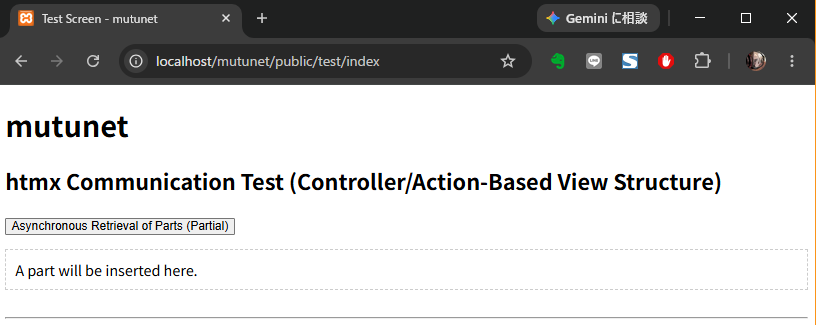
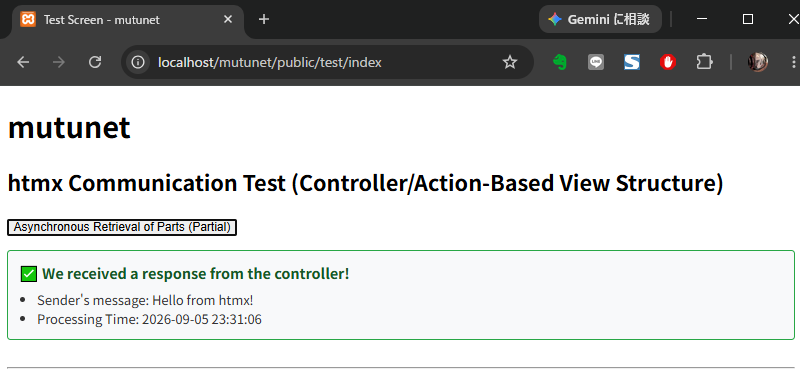
I ran a tutorial on using HTMX to dynamically manipulate the DOM via Ajax.
<!DOCTYPE html><html></html>Creating an outer frame definition file
As the <head></head> section is largely common across all pages, it has been designed to be reusable. The
[layouts] folder is intended, according to local conventions,
to ‘define layouts common to all applications’
.
/mutunet/resources/views/layouts/app.blade.php
|
1 2 3 4 5 6 7 8 9 10 11 12 13 14 15 16 17 18 19 20 |
<!DOCTYPE html> <html lang="ja"> <head> <meta charset="UTF-8"> <meta name="viewport" content="width=device-width, initial-scale=1.0"> <meta name="csrf-token" content="{{ csrf_token() }}"> <title>@yield('title', 'mutunet')</title> <script src="https://unpkg.com/htmx.org@1.9.12"></script> </head> <body hx-headers='{"X-CSRF-TOKEN": "{{ csrf_token() }}"}'> <header> <h1>mutunet</h1> </header> <main> @yield('content') </main> </body> </html> |
Creating screen templates that respond to the controller
I find it more motivating to build things from the screen.
The controller name is ‘test’
The default action is ‘index’
So the URL is ‘http://localhost/mutunet/public/test/index’
Add the HTMX functionality to the <button>
Use the following file path in the local rules
/mutunet/resources/views/Controller name/Action Name.blade.php
/mutunet/resources/views/test/index.blade.php
|
1 2 3 4 5 6 7 8 9 10 11 12 13 14 15 16 17 |
@extends('layouts.app') @section('title', 'Test Screen - mutunet') @section('content') <h2>htmx Communication Test (Controller/Action-Based View Structure)</h2> <button hx-get="{{ route('test.fetchPartial') }}" hx-vals='{"msg": "Hello from htmx!"}' hx-target="#result" hx-swap="outerHTML"> Asynchronous Retrieval of Parts (Partial) </button> <div id="result" style="margin-top: 15px; padding: 10px; border: 1px dashed #ccc;"> A part will be inserted here. </div> @endsection |
Creating a component screen template that is loaded dynamically
HTMX Tutorial
Under the local rules, components use the following file paths
/mutunet/resources/views/Control Name/partials/Action name.blade.php
/mutunet/resources/views/test/partials/fetchPartial.blade.php
|
1 2 3 4 5 6 7 8 9 |
<div id="result" style="margin-top: 15px; padding: 12px; border: 2px solid #28a745; border-radius: 4px; background-color: #f8f9fa;"> <p style="margin: 0; color: #155724; font-weight: bold;"> ✅ We received a response from the controller! </p> <ul style="margin: 8px 0 0 0; padding-left: 20px; font-size: 0.9em; color: #333;"> <li>Sender's message: {{ $message }}</li> <li>Processing Time: {{ $timestamp }}</li> </ul> </div> |
Creating a PHP Controller
/mutunet/app/Http/Controllers/TestController.php
|
1 2 3 4 5 6 7 8 9 10 11 12 13 14 15 16 17 18 19 20 21 22 23 24 25 26 27 28 29 30 31 |
<span class="hljs-meta"><?php</span> <span class="hljs-keyword">namespace</span> <span class="hljs-title">App</span>\<span class="hljs-title">Http</span>\<span class="hljs-title">Controllers</span>; <span class="hljs-keyword">use</span> <span class="hljs-title">Illuminate</span>\<span class="hljs-title">Http</span>\<span class="hljs-title">Request</span>; <span class="hljs-keyword">use</span> <span class="hljs-title">Illuminate</span>\<span class="hljs-title">View</span>\<span class="hljs-title">View</span>; <span class="hljs-class"><span class="hljs-keyword">class</span> <span class="hljs-title">TestController</span> <span class="hljs-keyword">extends</span> <span class="hljs-title">Controller</span> </span>{ <span class="hljs-comment">/** * Initial display */</span> <span class="hljs-keyword">public</span> <span class="hljs-function"><span class="hljs-keyword">function</span> <span class="hljs-title">index</span><span class="hljs-params">()</span>: <span class="hljs-title">View</span> </span>{ <span class="hljs-keyword">return</span> view(<span class="hljs-string">'test.index'</span>); } <span class="hljs-comment">/** * htmx用 Partial View Return */</span> <span class="hljs-keyword">public</span> <span class="hljs-function"><span class="hljs-keyword">function</span> <span class="hljs-title">fetchPartial</span><span class="hljs-params">(Request $request)</span>: <span class="hljs-title">View</span> </span>{ $data = [ <span class="hljs-string">'message'</span> => $request->input(<span class="hljs-string">'msg'</span>, <span class="hljs-string">'No parameters'</span>), <span class="hljs-string">'timestamp'</span> => now()->format(<span class="hljs-string">'Y-m-d H:i:s'</span>), ]; <span class="hljs-comment">// resources/views/test/partials/fetchPartial.blade.php </span> <span class="hljs-keyword">return</span> view(<span class="hljs-string">'test.partials.fetchPartial'</span>, $data); } } |
Add routing
Under the local rules, routing configurations are managed in separate files for each controller, so the path is as follows.
/mutunet/routes/controllers/routesController filename.php
/mutunet/routes/controllers/routesTestController.php
|
1 2 3 4 5 6 7 8 9 |
<span class="hljs-meta"><?php</span> <span class="hljs-keyword">use</span> <span class="hljs-title">App</span>\<span class="hljs-title">Http</span>\<span class="hljs-title">Controllers</span>\<span class="hljs-title">TestController</span>; <span class="hljs-comment">// http://localhost/mutunet/public/test/index</span> Route::get(<span class="hljs-string">'/test/index'</span>, [TestController::class, <span class="hljs-string">'index'</span>])->name(<span class="hljs-string">'test.index'</span>); <span class="hljs-comment">// http://localhost/mutunet/public/test/fetchPartial (htmx)</span> Route::get(<span class="hljs-string">'/test/fetchPartial'</span>, [TestController::class, <span class="hljs-string">'fetchPartial'</span>])->name(<span class="hljs-string">'test.fetchPartial'</span>); |
/mutunet/routes/web.php
|
1 2 3 4 |
<span class="hljs-meta"><?php</span> <span class="hljs-keyword">use</span> <span class="hljs-title">Illuminate</span>\<span class="hljs-title">Support</span>\<span class="hljs-title">Facades</span>\<span class="hljs-title">Route</span>; <span class="hljs-keyword">require</span> <span class="hljs-keyword">__DIR__</span> . <span class="hljs-string">'/controllers/routesTestController.php'</span>; <span class="hljs-comment">// added</span> |