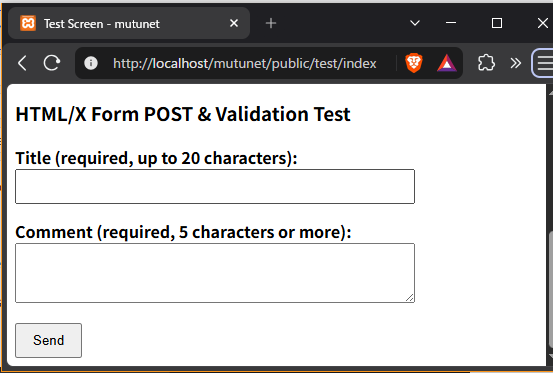
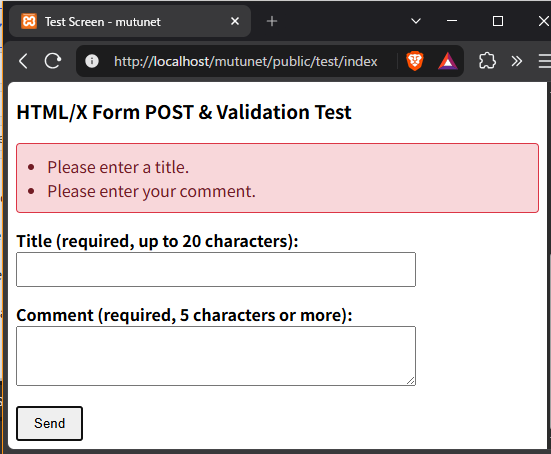
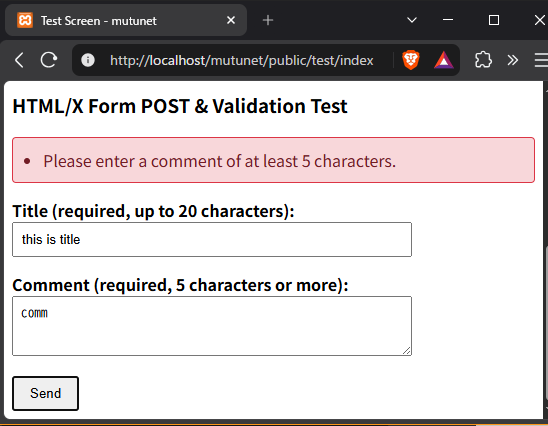
This is an implementation pattern for POST submissions (form submissions) using htmx and partial updates in the event of validation errors.
We will create a setup that submits form data via a POST request without reloading the entire page, and, if there are any errors, quickly updates only the form section (or the error display area).
1. Creating components for validation errors
Create a partial template for displaying error and success messages.
resources/views/test/partials/store.blade.php
HTML
|
1 2 3 4 5 6 7 8 9 10 11 12 13 14 15 16 17 18 19 |
<div id="form-result"> {{-- Display validation errors --}} @if ($errors->any()) <div style="padding: 10px; border: 1px solid #dc3545; background-colour: #f8d7da; colour: #721c24; border-radius: 4px; margin-bottom: 15px;"> <ul style="margin: 0; padding-left: 20px;"> @foreach ($errors->all() as $error) <li>{{ $error }}</li> @endforeach </ul> </div> @endif {{-- Submission successful message --}} @if (session('success')) <div style="padding: 10px; border: 1px solid #28a745; background-colour: #d4edda; colour: #155724; border-radius: 4px; margin-bottom: 15px;"> {{ session('success') }} </div> @endif </div> |
copy
2. Add a ‘store’ action to the controller
Add a store action to app/Http/Controllers/TestController.php to receive POST data from the form.
PHP
|
1 2 3 4 5 6 7 8 9 10 11 12 13 14 15 16 17 18 19 20 21 22 23 24 25 26 27 28 29 30 31 32 33 34 35 36 37 38 39 40 41 42 43 44 45 46 47 48 49 50 51 52 53 54 55 |
<?php namespace App\Http\Controllers; use Illuminate\Http\Request; use Illuminate\View\View; class TestController extends Controller { public function index(): View { return view('test.index'); } public function fetchPartial(Request $request): View { $data = [ 'message' => $request->input('msg', 'No parameters'), 'timestamp' => now()->format('Y-m-d H:i:s'), ]; return view('test.partials.fetchPartial', $data); } /** * POST submission and validation processing for HTMLX */ public function store(Request $request): View { // Execute validation // Note: Even when using HTMLX, Laravel’s standard validation logic can be used as is $validator = \Illuminate\Support\Facades\Validator::make($request->all(), [ 'title' => 'required|max:20', 'comment' => 'required|min:5', ], [ 'title.required' => 'Please enter a title.', 'title.max' => 'Please enter a title of no more than 20 characters.', 'comment.required' => 'Please enter a comment. ', 'comment.min' => 'Please enter a comment of at least 5 characters.', ]); // If there are errors if ($validator->fails()) { return view('test.partials.store') ->withErrors($validator); } // Processing after validation (simulated processing such as saving to the database) // ... // Return the partial with a success message return view('test.partials.store') ->with('success', '✅ ' . $request->input('title') . ' has been successfully accepted!'); } } |
3. Adding a route (routes/web.php)
Add a route for receiving POST requests.
/mutunet/routes/controllers/routesTestController.php
* The above file has already been included in /mutunet/routes/web.php
PHP
|
1 2 3 4 5 6 7 8 9 10 11 12 |
<?php use App\Http\Controllers\TestController; // First steps test // http://localhost/mutunet/public/test/index (display the entire page) Route::get('/test/index', [TestController::class, 'index'])->name('test.index'); // http://localhost/mutunet/public/test/fetchPartial (fetch an htmx partial template) Route::get('/test/fetchPartial', [TestController::class, 'fetchPartial'])->name('test.fetchPartial'); // POST route for htmx Route added in this example Route::post('/test/store', [TestController::class, 'store'])->name('test.store'); |
4. Add a form to the view (test/index.blade.php)
Add a form using hx-post.
resources/views/test/index.blade.php
HTML
|
1 2 3 4 5 6 7 8 9 10 11 12 13 14 15 16 17 18 19 20 21 22 23 24 25 26 27 28 29 30 31 32 |
@extends('layouts.app') @section('title', 'Test Page - mutunet') @section('content') <hr style="margin: 30px 0;"> <h3>htmx form POST & validation test</h3> {{-- Where to insert error/success messages --}} <div id="form-result"></div> {{-- Submit form contents using hx-post and insert the result into #form-result (outerHTML) --}} <form hx-post="{{ route('test.store') }}" hx-target="#form-result" hx-swap="outerHTML" style="max-width: 400px;"> <div style="margin-bottom: 15px;"> <label for="title" style="display: block; font-weight: bold;">Title (required, max. 20 characters):</label> <input type="text" id="title" name="title" style="width: 100%; padding: 8px; box-sizing: border-box;"> </div> <div style="margin-bottom: 15px;"> <label for="comment" style="display: block; font-weight: bold;">Comment (required – 5 characters or more):</label> <textarea id="comment" name="comment" rows="3" style="width: 100%; padding: 8px; box-sizing: border-box;"></textarea> </div> <button type="submit" style="padding: 8px 16px; cursor: pointer;">Submit</button> </form> <!-- The text above this point is the additional content for this matter --> @endsection |
* As hx-headers='{“X-CSRF-TOKEN”: “{{ csrf_token() }}”}’ is set within the body tag of the base layout (layouts/app.blade.php), the CSRF token is sent automatically without the need to include @csrf within the form.
5. Verification of operation
-
Reload http://localhost/mutunet/public/test/index in your browser.
-
Leave the fields blank and click ‘Send’.
-
Check that the entire screen does not reload and that validation errors are displayed within the red box.
-
-
Enter a title (up to 20 characters) and a comment (at least 5 characters), then submit.
-
Check that a success message appears in the green box.
-
Regarding ‘store.blade.php’,
we will adopt a policy of not using Blade directives for conditional statements and loops.
Please replace ‘@if’ and ‘@foreach’ with ‘<?php’.
This is the code from resources/views/test/partials/store.blade.php, where Blade directives such as @if and @foreach have been replaced with standard PHP control structures (<?php ... ?>).
HTML
|
1 2 3 4 5 6 7 8 9 10 11 12 13 14 15 16 17 18 19 20 |
<div id="form-result"> <?php /* Display validation errors */ ?> <?php if ($errors->any()): ?> <div style="padding: 10px; border: 1px solid #dc3545; background-colour: #f8d7da; colour: #721c24; border-radius: 4px; margin-bottom: 15px;"> <ul style="margin: 0; padding-left: 20px;"> <?php foreach ($errors->all() as $error): ?> <li><?php echo e($error); ?></li> <?php endforeach; ?> </ul> </div> <?php endif; ?> <?php /* Submission successful message */ ?> <?php if (session('success')): ?> <div style="padding: 10px; border: 1px solid #28a745; background-colour: #d4edda; colour: #155724; border-radius: 4px; margin-bottom: 15px;"> <?php echo e(session('success')); ?> </div> <?php endif; ?> </div> |
A quick note
-
XSS protection (escape processing) Blade’s {{ $variable }} automatically performs htmlspecialchars (XSS escaping), but when outputting variables using PHP tags, you can achieve the same level of escaping by writing <?php echo e($variable); ?>.
-
Alternative syntax (if: / endif;) When writing PHP within HTML, it is recommended to use
if (...):~endif;orforeach (...):~endforeach;rather than curly brackets{ }, as this makes the relationship with the HTML structure easier to understand.
An explanation I came across demonstrating the advantages of Laravel Blade directives
-
Improved readability
-
Code simplification
-
Template Inheritance and Componentisation: Security (XSS Countermeasures)
Unless there is something else besides these, I cannot see any reason to use Blade directives.
Explanation of the HTMX used
<form hx-post=”{{ route(‘test.store’) }}”
hx-target=”#form-result”
hx-swap=”outerHTML”
style=”max-width: 400px;”>
Could you please explain the ‘hx’ attribute?
This is an explanation of the htmx-specific attributes (hx-*) specified in the form tag.
In htmx, by adding these attributes, you can implement asynchronous communication (Ajax) and partial page updates using HTML alone, without having to write your own JavaScript.
1. hx-post=”{{ route(‘test.store’) }}”
-
Meaning: When a form submit event occurs, it asynchronously sends a POST request to the specified URL.
-
Action:
-
Unlike a standard HTML form, it does not reload or redirect the entire page, but instead submits the data to /test/store in the background.
-
It automatically parses the values of each input element in the form (such as name=”title” or name=”comment”) and includes them as request parameters.
-
2. hx-target=”#form-result”
-
Meaning: Specifies ‘which DOM element’ the response (HTML fragment) returned from the server should be applied to.
-
Action:
-
Specify this using the CSS selector syntax (where #form-result refers to the element with the ID ‘form-result’).
-
If this is not specified, by default the source element itself (in this case, the <form> tag) will be updated.
-
3. hx-swap=”outerHTML”
-
Meaning: Specifies ‘how’ the HTML returned from the server should be substituted for the target element (#form-result).
-
Action:
-
outerHTMLreplaces the target element—‘in its entirety, including the element itself’—with the response from the server. -
If you specify
innerHTML(the default), it will replace ‘only the inner content’ of the target element.
-
Summary of Overall Operation
-
When the user clicks the ‘Submit’ button, the values of the form elements are sent in a single POST request to /test/store (the test.store root).
-
Receive the component (store.blade.php) returned from the server (TestController@store).
-
Replace the entire <div id=”form-result”></div> element on the screen with the received HTML in its entirety.
I was able to add an error message to the screen by pressing the ‘Send’ button.